
What a label rewinder does on the floor
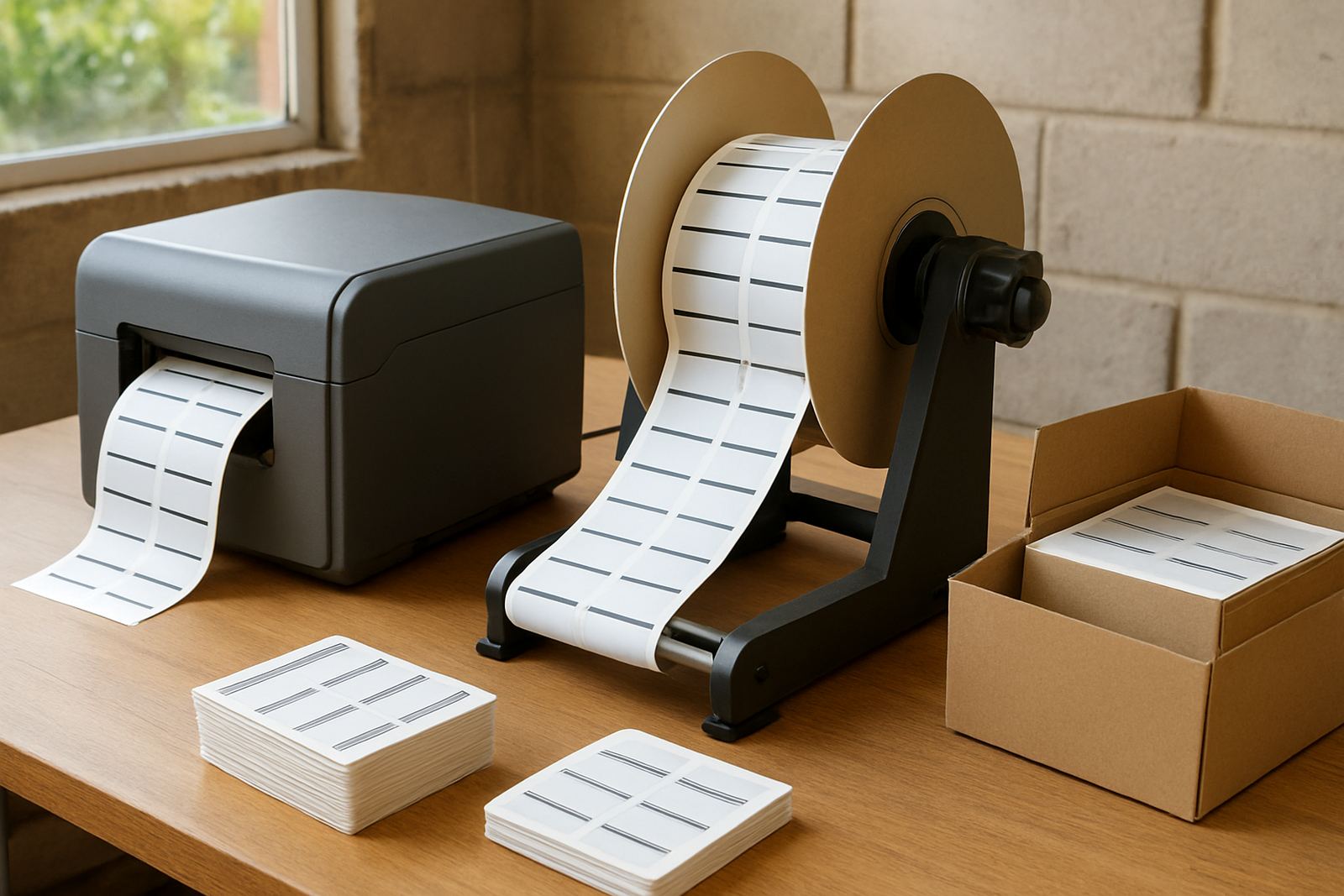
A label rewinder sits at the output side of a label printer and winds the printed web onto a core instead of letting it fall in a loose stack. That matters when you are printing pressure-sensitive labels, small batch stickers, or traceable product labels that must stay in sequence. It keeps the media under controlled tension, so the final roll is more consistent and easier to handle.
For busy production rooms in Midrand, Pretoria, and the East Rand, the main benefit is simple: fewer damaged labels and less time spent sorting material by hand. It also helps when you need to move rolls between machines, because a neat rewind is easier to load onto a cutter, slitter, or inspection station. In many print shops, the rewinder becomes part of the standard finishing line, not just an add-on.
- Winds printed labels into a tight, usable roll
- Helps keep print order and registration consistent
- Reduces handling damage after printing
- Makes packing and stock control easier
Typical sizes, core options, and unwind styles
Label rewinders are usually selected around the width of the media, the roll diameter you want to build, and the core size your workflow uses. Common working widths cover narrow label stock through to wider self-adhesive rolls used for cartons, bottles, and product branding. In practice, many operations want a machine that can handle a few different label sizes without constant adjustment.
Core sizes are important because they determine how the finished roll fits onto the next process. Many shops use 25 mm, 40 mm, or 76 mm cores depending on the printer and finishing equipment. Some rewinders wind with the printed side in or out, which helps when labels must feed into a dispensing unit or be stored a certain way. Check the unwind direction on your printer and the take-up direction on the rewinder before ordering, because a mismatch can waste time and media.
- Working width matched to your widest label roll
- Core options for small and standard production rolls
- Forward or reverse winding for different print setups
- Adjustable tension for lighter films and heavier papers
Where a rewinder suits best in SA production work
This accessory suits print shops that run labels for cosmetics, food packs, chemicals, logistics, events, and retail pricing. It is especially useful where short runs change often, because a printer may finish one job and start another within minutes. Instead of stacking loose labels across a table, the rewinder keeps each job compact and identified.
In humid coastal areas, neat rewind also helps protect printed rolls from picking up dust and edge curl while they wait for packing. Inland shops often value speed more than storage, especially when load-shedding forces people to finish jobs as efficiently as possible before the next outage. If your team works across Johannesburg, Pretoria, or neighbouring markets, the same machine can support export orders and local dispatches with very little fuss.
- Short-run label production
- Variable data and sequential numbering jobs
- Barcode, inventory, and packaging labels
- Shop floors where space is limited
Installation, power requirements, and day-to-day setup
Most label rewinders are straightforward to install. They are usually placed in line with the printer output, level with the machine so the web runs straight through without unnecessary drag. A stable stand or bench is important, because if the unit sits crooked the roll can wander and build uneven edges. For best results, the operator should align the web path and set tension before starting the job.
Power needs are normally modest. Many units run from standard single-phase supply, so you do not need special gas connections or heavy infrastructure. That makes them practical for small to medium print rooms, including shared work spaces and production areas with basic electrical supply. If the workshop has load-shedding backup, the rewinder can usually sit on the same protected circuit as the printer and finishing table, although you should always check the combined load before switching on. A clean cable run and enough clearance behind the unit will make daily use easier.
- Level mounting with a straight web path
- Standard single-phase power on many models
- No gas or compressed air needed for normal operation
- Allow space for roll build-up and operator access
Care, servicing, and avoiding damaged rolls
A rewinder does not need complicated upkeep, but it does need regular attention if you want even rolls. Dust, adhesive residue, and paper fibres can build up around the shaft and guides. Wipe the unit down often and check that the core holder grips properly. If your labels use aggressive adhesive or synthetic face stock, inspect the contact points more often because residue can change tension and cause the roll to track to one side.
Preventive maintenance should include checking bearings, belts or drive parts where fitted, and confirming that the tension setting still matches the material you run most often. If the roll starts telescoping, creasing, or growing loose on one edge, stop and reset the setup rather than forcing the job through. A quick correction usually saves the print run. For shops in coastal or high-dust environments, planned servicing is worth the effort because it keeps the machine ready when orders come in back to back.
- Clean away dust and adhesive build-up
- Check tension settings when changing media
- Inspect the core holder and drive parts regularly
- Book servicing before faults affect production
What to verify before ordering matte label media
Before you order a label rewinder, measure the widest label roll you intend to run and confirm the finished roll diameter you want to achieve. Then check core size, winding direction, printer output height, and whether you need manual or powered take-up. If you are running several materials, list the heaviest one as well, because that usually drives the right tension range and shaft specification.
It also helps to know whether the rewinder must sit beside a digital label printer, a transfer printer, or a separate finishing line. Tell us about your label stock, whether you are using paper or synthetic media, and how many rolls you expect to finish in a shift. That gives a clearer picture of duty cycle and any practical extras such as guides, core adaptors, or a support stand. For teams in Johannesburg and across Southern Africa, getting these details right at the start avoids delays later on.
- Media width and roll diameter
- Core size and winding direction
- Printer output height and space on the bench
- Material type, duty cycle, and finishing method
Key facts
| Product type | Label rewinder for printed label rolls |
|---|---|
| Typical media widths | Narrow label stock up to wider production rolls, subject to model |
| Core sizes | Common options include 25 mm, 40 mm, and 76 mm |
| Power requirement | Usually standard single-phase supply |
| Use case | Short-run labels, barcodes, packaging, and variable data work |
| Placement | Inline with label printers and finishing stations |